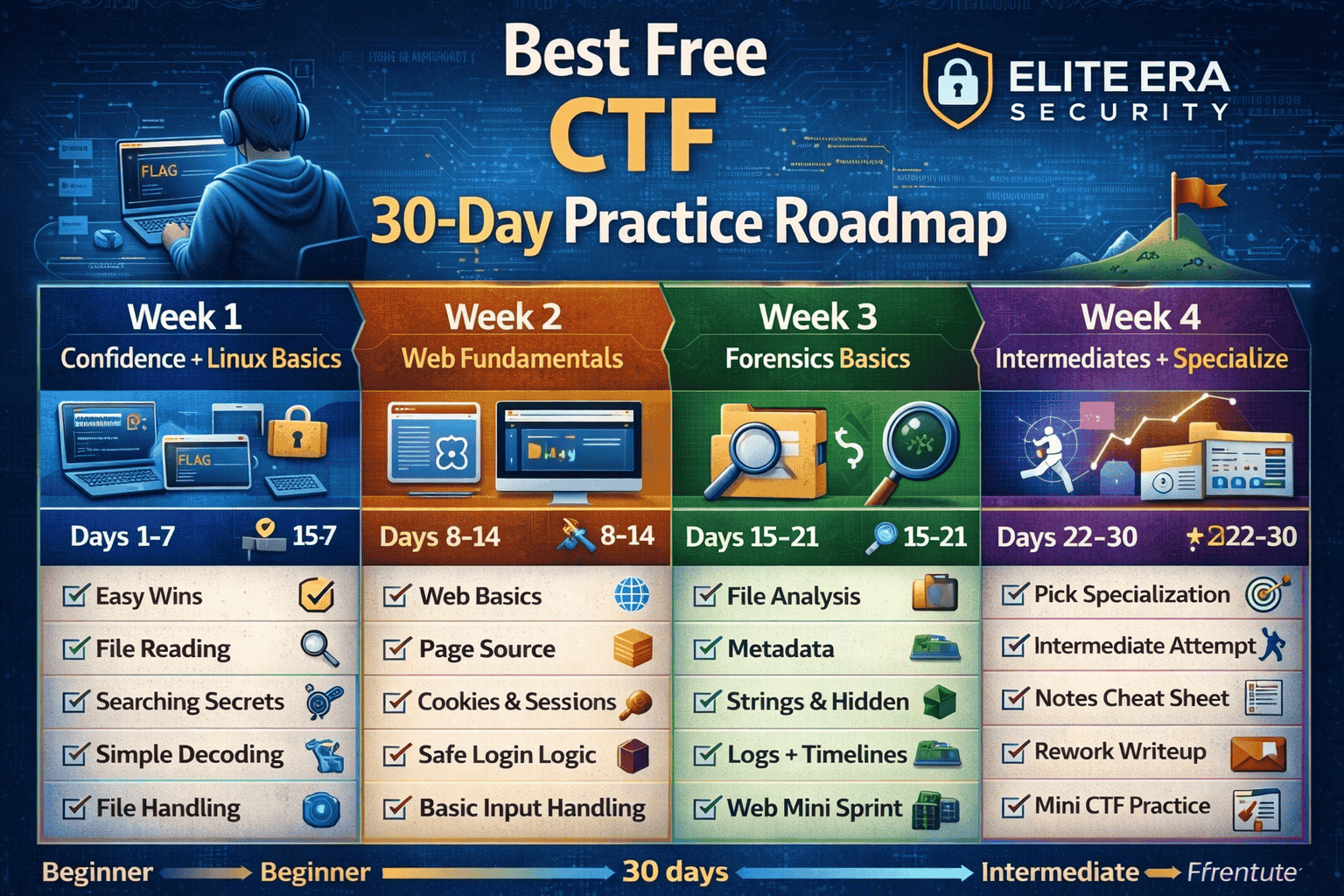
Best Free CTF Practice Roadmap (30 Days) 2026: Beginner to Intermediate (Daily Plan)
If you’re serious about learning cybersecurity through CTFs (Capture The Flag), the biggest difference between people who improve and people who quit is simple: structure.
Most beginners jump between random challenges, get stuck, and lose motivation. This 30-day roadmap fixes that by giving you a clear daily plan using free CTF practice and beginner-friendly training habits. It’s designed for common people who are starting from zero and want measurable progress especially in the US and Europe market where “hands-on skill” matters more than buzzwords.
This is not a “do everything” plan. It’s a smart progression: confidence first, fundamentals next, then specialization without overwhelming tools or complicated setup.
If you haven’t chosen a platform yet, start here: my guide on the best free CTF platforms for absolute beginners explains which platform fits your goal (Linux, Web, Crypto, or Forensics).
What you’ll achieve in 30 days
By the end of this plan, you should be able to:
- Solve beginner and early-intermediate CTF challenges confidently
- Use a repeatable workflow instead of guessing
- Understand core categories: Linux, Web, Crypto, Forensics
- Write clean notes and simple writeups (even if you’re not technical)
- Identify your best specialization path (Web / Forensics / Crypto / Blue Team)
If you follow the plan with consistency (even 30–60 minutes/day), you’ll be far ahead of most beginners who “try CTF” without a roadmap.
New to setup and tools? Read this first: Best Free CTF Starter Kit (2026) it covers the beginner setup, legal rules, and the exact workflow to solve your first challenges
Before you start: time, tools, and mindset
Time commitment (realistic)
Choose one:
- 30 minutes/day (slow, steady progress)
- 60 minutes/day (best results)
- 90 minutes/day (fast progress, but don’t burn out)
Consistency beats intensity. Missing one day is fine. Missing one week kills momentum.
What tools you need
You do not need heavy tools to follow this plan. Keep it simple:
- Browser (separate profile recommended)
- Terminal (built-in)
- Notes file (your “CTF Journal”)
- Zip tool + text editor
Your CTF Journal
Most people fail because they never convert challenges into memory.
Use this format:
- Challenge name + category
- What I tried first
- What worked
- Lesson learned (1–2 lines)
- Commands / keywords to remember
This makes your brain build patterns instead of forgetting everything.
How this roadmap is structured
This roadmap has 4 weeks, each with a different goal:
- Week 1: Quick wins + Linux comfort (build confidence)
- Week 2: Web fundamentals (high job-value skills)
- Week 3: Forensics + investigation mindset (strong beginner ROI)
- Week 4: Intermediate bridge + specialization (level up)
Each day has:
- Main task (what to practice)
- Goal (what skill you’re building)
- Checkpoint (how to know you improved)
Week 1 (Days 1–7): Confidence and Linux foundations
Week 1 is about building momentum. You’ll solve easy challenges that teach observation, basic commands, and simple decoding. Don’t chase hard flags. Your target is clean wins and habit-building.
Day 1 — Set up + first wins
Main task: create your CTF journal + solve 2 easy “general skills” puzzles
Goal: understand what a flag is and how challenges are structured
Checkpoint: you wrote 2 mini writeups (3–5 lines each)
Day 2 — Linux basics (navigation)
Main task: practice basic terminal navigation + solve 2 Linux-style beginner tasks
Goal: become comfortable reading files and moving directories
Checkpoint: you can explain what a directory is and how you found a file
Day 3 — Searching & pattern spotting
Main task: solve 2 challenges that require searching text / finding hidden clues
Goal: learn to locate important information fast
Checkpoint: your notes include at least 3 commands/keywords you learned
Day 4 — Simple decoding day
Main task: solve 2–3 beginner crypto puzzles (base64 / hex / simple substitution)
Goal: recognize common encoding patterns
Checkpoint: you can identify base64 vs hex without guessing
Day 5 — File handling day (zip, txt, images)
Main task: solve 2 beginner forensics tasks (zip extraction, strings, metadata)
Goal: learn how files hide clues
Checkpoint: you recorded your steps clearly in your journal
Day 6 — Mixed practice (small combo)
Main task: solve 3 easy challenges across 2 categories (Linux + Crypto OR Forensics + Web basics)
Goal: build flexibility without overload
Checkpoint: you did not switch platforms repeatedly—stayed focused
Day 7 — Weekly review + repeat one challenge faster
Main task: re-solve 1 old challenge without looking at the solution + clean your notes
Goal: convert practice into skill
Checkpoint: you solved something faster than Day 1
Week 1 success metric:
You solved ~12–15 beginner challenges and your journal has clear notes.
Week 2 (Days 8–14): Web fundamentals that make you “job-ready”
Week 2 is where many learners level up. Web CTF is valuable because it teaches how websites actually work—requests, cookies, sessions, and basic logic mistakes.
You are NOT “attacking real websites.” You are learning web behavior inside safe labs.
Day 8 — Web basics (requests & responses)
Main task: complete web intro lessons + solve 1–2 very easy web challenges
Goal: understand request/response, headers, and parameters
Checkpoint: you can explain what a cookie is in one sentence
Day 9 — Page source + hidden elements
Main task: solve 2 beginner web challenges that involve page source or hidden fields
Goal: learn where beginners miss obvious clues
Checkpoint: you wrote a note: “Where I checked first, second, third”
Day 10 — Authentication basics
Main task: solve 1–2 web challenges focused on login logic (safe labs)
Goal: understand authentication vs session
Checkpoint: you can explain “session” in plain English
When you’re ready to expand your toolkit (without overwhelm), this beginner guide breaks down the most useful ethical hacking tools and what each one is actually for.
Day 11 — Cookies & sessions practice
Main task: solve 2 challenges involving cookies or session behavior
Goal: learn how state is stored
Checkpoint: you wrote down what changed and why it mattered
Day 12 — Input handling (concept-first)
Main task: learn basic input validation concepts + solve 1 beginner web puzzle
Goal: understand why websites break when input is not validated
Checkpoint: you can define “input validation” simply
Day 13 — Web mini sprint
Main task: solve 3 small web challenges (easy only)
Goal: practice workflow: read → inspect → test → note
Checkpoint: you did not get stuck more than 20 minutes on one task
Day 14 — Weekly review and write one clean writeup
Main task: choose your best web challenge and write a clean mini writeup (8–12 lines)
Goal: learn to communicate your thinking
Checkpoint: your writeup explains “why it worked,” not just “what I did”
Week 2 success metric:
You understand cookies/sessions basics and can solve beginner web tasks without panic.
If you prefer structured lessons alongside CTF practice, these free ethical hacking courses give you a step-by-step learning path you can follow weekly.
Week 3 (Days 15–21): Forensics and investigation mindset
Forensics is great for beginners because it teaches observation, file analysis, and real investigative thinking skills used in blue team work and incident response.
Day 15 — File types & quick inspection
Main task: solve 2 forensics challenges (file type, extraction, simple analysis)
Goal: learn “what am I looking at?”
Checkpoint: you wrote “file type + how I confirmed it”
Day 16 — Metadata day
Main task: solve 2 challenges involving image/document metadata
Goal: learn how hidden details leak clues
Checkpoint: you can explain what metadata is and why it matters
Day 17 — Strings & hidden data
Main task: solve 2 challenges that require extracting readable strings or hidden text
Goal: learn basic triage of unknown files
Checkpoint: your notes include “what I looked for first”
Day 18 — Logs & timeline thinking
Main task: solve 1–2 challenges using logs or text dumps
Goal: build investigation instincts
Checkpoint: you wrote a timeline or sequence of events (even simple)
Day 19 — Stego beginner day (optional but useful)
Main task: solve 1 easy stego challenge + 1 normal forensics challenge
Goal: recognize when “hidden data” might exist
Checkpoint: you wrote “why I suspected stego”
Day 20 — Mixed forensics sprint
Main task: solve 3 easy-medium forensics challenges
Goal: speed + pattern recognition
Checkpoint: you reused your notes from earlier days
Day 21 — Weekly review + “teach yourself”
Main task: write a 10-line summary: “What I learned about forensics this week”
Goal: convert learning into clear understanding
Checkpoint: you can explain your process without tools
Week 3 success metric:
You can approach unknown files calmly and extract useful clues systematically.
Week 4 (Days 22–30): Intermediate bridge and specialization
Week 4 is about leveling up while staying realistic. You’ll push into early-intermediate challenges, but with strict rules: no endless stuck time, no random copying.
Day 22 — Choose your specialization track
Pick ONE:
- Web track (best for job demand)
- Forensics track (best for investigation/blue team)
- Crypto track (best for puzzle + math mindset)
- Blue team track (logs, alerts, response thinking)
Checkpoint: you chose one track and wrote “why” in 2 lines.
Day 23 — Intermediate attempt day
Main task: attempt 2 challenges slightly harder than usual (same track)
Goal: learn how intermediate problems feel
Rule: if stuck >20 minutes, read a hint or step back
Checkpoint: you learned at least one new concept
Day 24 — Build a “cheat sheet”
Main task: create a one-page cheat sheet from your notes
Include:
- common encodings
- common web checks
- file triage steps
- your workflow
Checkpoint: you now have a repeatable reference.
Day 25 — Writeup improvement day
Main task: rewrite one old writeup to be cleaner and more explanatory
Goal: skill + communication
Checkpoint: your writeup answers: What, Why, How, Lesson
Day 26 — Intermediate sprint (small)
Main task: solve 2–3 challenges (same track)
Goal: momentum at higher level
Checkpoint: you solved at least one without hints
Day 27 — Weakness day (fix your gap)
Main task: choose your weakest category and do 1 beginner + 1 intermediate attempt
Goal: balance your skills
Checkpoint: you wrote the gap you fixed
Day 28 — Simulated “mini CTF”
Main task: do a 60–90 minute session: 4 challenges total across 2 categories
Goal: practice real CTF pacing
Checkpoint: you managed time and avoided getting stuck
Day 29 — Review + plan your next 30 days
Main task: decide what you’ll do next month
Choose:
- “Web only”
- “Forensics only”
- “Mixed + weekly review”
Checkpoint: you wrote a simple next-plan (3 bullets)
Day 30 — Final test: solve one new challenge start-to-finish
Main task: solve 1 new challenge and write a clean explanation
Goal: prove progress
Checkpoint: your writeup is understandable to a beginner
Week 4 success metric:
You can handle early-intermediate challenges in at least one track with a clear method.
Common mistakes that stop progress
Beginners often sabotage themselves without realizing it. Avoid these and you’ll rank up fast:
- Platform hopping daily (choose 1–2 platforms and stick to them weekly)
- Copy-pasting writeups without learning (use writeups to understand, not to “finish”)
- No notes (you’ll forget and repeat the same mistakes)
- No time limit (staying stuck for hours kills motivation)
- Too many tools too early (learn the concept first)
Best “free” practice rules (for safe progress)
To keep this roadmap safe, legal, and beginner-friendly:
- Practice only on platforms meant for training
- Never test anything you don’t own or lack permission to test
- Keep your learning environment separate (browser profile + dummy accounts)
- Use hints as learning tools, not shortcuts
- Aim for one lesson per challenge, not “speed runs”
FAQs
How long should I practice CTF daily?
For beginners, 30–60 minutes/day is ideal. Consistency matters more than long sessions.
Can a non-technical person follow this CTF roadmap?
Yes. This plan is designed for “common person” beginners. Start with Week 1, focus on small wins, and use notes every day.
Do I need Kali Linux or advanced tools to follow this plan?
No. Start with a browser, terminal, notes, and basic file tools. Add advanced tools only when you know why you need them.
What is the fastest track for job-ready skills?
In the US and Europe job markets, web fundamentals (cookies, sessions, authentication behavior) are a strong early skill path.
What if I get stuck every day?
Timebox your attempt to 15–20 minutes, then use a hint or change strategy. Stuck time is normal—what matters is learning the reason.
About The Author




