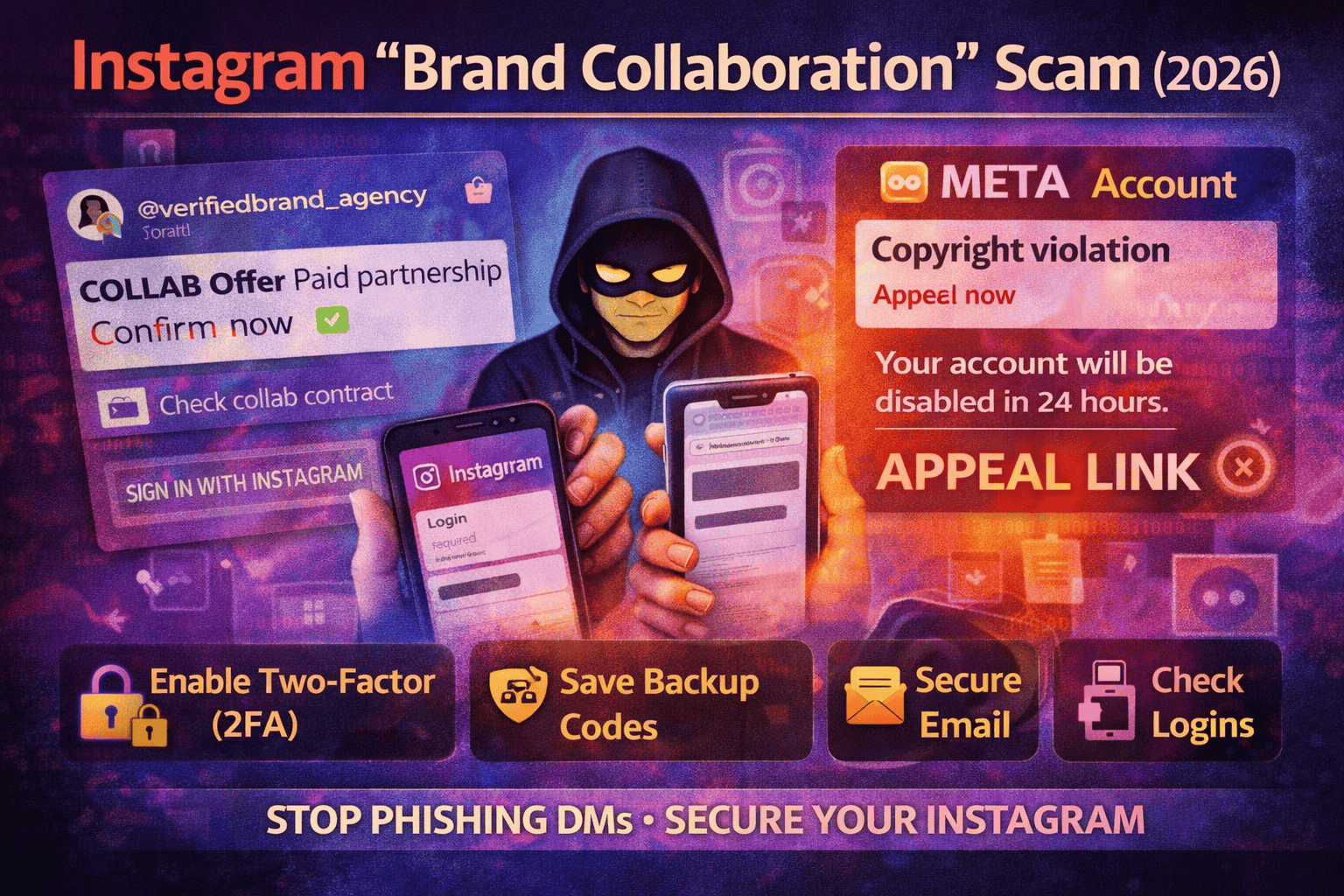
Instagram Page Hijack via “Brand Collaboration” Scam (2026): How It Works
One of the most common Instagram takeovers in 2026 begins with a message that feels good: “We love your content. Paid collaboration.” The account looks real, the offer sounds simple, and the link is presented like a normal business step—“review the brief,” “approve the campaign,” “confirm partnership.”
A second version starts with fear instead of excitement: “Your account violated copyright/policy. Submit appeal now or your page will be disabled.” These “appeal/verify” messages are a widely reported pattern in Instagram phishing and account takeover scams.
Either way, the trick is the same: push you to click a link and take an action quickly—log in, “verify,” or “appeal”—before you slow down and think.
This scam isn’t about advanced hacking tools. It’s about stealing access through a fake process that looks like a normal brand workflow.
In most cases, the attacker wants one of these things:
1) Your Instagram password (credentials phishing).
A fake page asks you to sign in. If you type your password, they can log in as you.
2) Your login confirmation or security code.
Some pages ask for a “code” or lead you into steps that make you approve an attacker’s login attempt.
3) A session/login token (cookie theft).
In some campaigns, the goal is to capture your active login session rather than your password.
Once the attacker gets access, they move fast: change email, change phone, change password, and try to add their own security method so you can’t easily get back in.
The two most common scam types you’ll see in DMs
Scam type 1: “Paid collab” → brief/contract link → fake login page
This version is designed to feel like business.
It usually starts with compliments and a quick offer:
- “Paid partnership available.”
- “We’ll send product + payment.”
- “Approve your campaign here.”
Then they share a link that claims to be:
- a contract
- a brand portal
- a campaign approval form
- a “collaboration dashboard”
When you open the link, it asks you to “log in to continue.” That’s the trap. Real collaborations do not require you to log in on random pages from a DM.
Scam type 2: “Meta/Instagram violation” → appeal/verify link
This version uses panic.
The message claims:
- copyright infringement
- community guidelines violation
- report complaints
- risk of disable/ban
Then it says you must appeal or verify immediately.
This “appeal/verify” pattern is repeatedly seen in Instagram takeover scams and is commonly used to push victims into fake login pages.
How the takeover happens step-by-step
Here’s the real flow behind most hijacks:
Step 1: They create urgency
They don’t want you to verify anything. They want you to react quickly:
- “Confirm today.”
- “Last warning.”
- “Account will be disabled.”
Step 2: They redirect you outside Instagram
The moment you leave Instagram to a browser page, risk increases. The attacker controls what you see next.
Step 3: They collect your login (and sometimes your 2FA code)
If you enter your password, they can attempt login immediately. If you also enter a security code, you may have just approved their access.
Step 4: They lock your account
Common changes in the first minutes:
- email changed
- phone number changed
- password changed
- 2FA settings modified
- recovery methods updated
Step 5: They weaponize your account
After takeover, attackers often:
- DM your followers with “investment,” “giveaway,” “help me,” or “send code” scams
- post stories with fake links
- demand money to “return” your account
- reuse your identity to scam more people
Red flags that instantly identify the scam
Use these as your “stop signs”:
Red flag 1: “Appeal/Verify” link inside a DM
Meta’s own guidance is clear: if you get suspicious messages claiming to be from Meta, don’t click links or attachments and don’t respond.
Red flag 2: A “collab” that requires login to view a file
A PDF brief does not require Instagram login. A contract doesn’t require you to type your password on a random page.
Red flag 3: The offer is rushed or strangely easy
Real brands negotiate, clarify deliverables, and provide real contact details. Scammers push urgency.
Red flag 4: They ask for codes, screenshots, or “confirmation”
Any request for:
- login code
- 2FA code
- backup codes
- screenshots of security settings
…is a takeover attempt.
Red flag 5: The “brand” can’t be verified outside Instagram
If you can’t confirm a company website, official email domain, or real public presence, don’t proceed.
Safe way to handle real collaboration requests
You can still accept real brand deals. Just run this simple process:
1) Move the conversation to email (and verify the domain)
Ask for an email from the brand’s official domain (example: name@brand.com).
If they refuse and insist on “just click this link,” treat it as suspicious.
2) Verify independently (don’t trust what they send)
Search the brand on Google. Open the official website yourself. Check verified accounts. Compare names and contact info.
3) Never log in through a DM link
If something requires login, open Instagram directly in your app or type the official URL yourself (not from their message).
4) If you manage a business account, be extra careful with “Meta Business” invites
Some phishing campaigns impersonate business programs and invitations to capture credentials.
Free prevention checklist
These steps dramatically reduce takeover risk.
Turn on Two-Factor Authentication (2FA)
Instagram provides official guidance for enabling 2FA. Turn it on so a stolen password alone isn’t enough.
Save backup codes
Backup codes are your emergency keys if you lose access to your 2FA method. Instagram explains exactly how to get and use them.
Protect your email
If your email gets compromised, attackers can reset Instagram and intercept recovery links. Secure your email with a strong password + MFA.
Use official recovery paths only
If you ever get locked out, use Instagram’s official hacked / recovery guidance rather than any “support” link in messages.
If you clicked the link (or entered your password), do this immediately
Even if your account still “looks fine,” act fast.
Step 1: Change your Instagram password inside the app
Do it from Instagram settings (not the browser page you visited).
Step 2: Check your email + phone on the account
If either has changed, you’re in takeover territory.
Step 3: Turn on 2FA and generate fresh backup codes
If you already had 2FA, regenerate backup codes so old ones are useless.
Step 4: Check your login/security activity and log out unknown sessions
If you see unfamiliar logins/devices, remove them and secure the account.
Step 5: If you can’t log in, go straight to the official “hacked” flow
Instagram’s official hacked flow is the correct path for recovery.
If your account is already hijacked: what to do (realistic recovery path)
If the attacker changed your email/phone and you’re locked out:
- Use Instagram’s official hacked recovery steps (don’t pay anyone; don’t use random “support” pages).
- Check your email inbox for any “email changed” or “password changed” notices and follow official reversal steps where available.
- Once recovered, immediately: change password, enable 2FA, generate backup codes, remove unknown sessions.
- Post a Story/status warning followers to ignore DMs/links until you confirm recovery.
Meta has also been rolling out improved account recovery support hubs for hacked accounts, aimed at simplifying recovery.
FAQs
Is Meta/Instagram really sending me a DM about violations?
Scammers commonly impersonate Meta and send “appeal/verify” links. Meta’s guidance: don’t click suspicious links/attachments and don’t respond.
If I have 2FA, can I still lose my account?
2FA helps a lot, but you can still lose access if you type credentials into a fake page and then share/enter codes. That’s why avoiding DM links is critical.
What’s the fastest way to confirm it’s a scam?
If the next step is click a link → log in → verify/appeal, treat it as phishing. Use official Instagram settings/recovery pages instead.
What should I do if my followers are getting scam messages from my account?
Assume takeover. Recover via official hacked flow, then warn followers publicly and delete scam content after you regain access
About The Author




