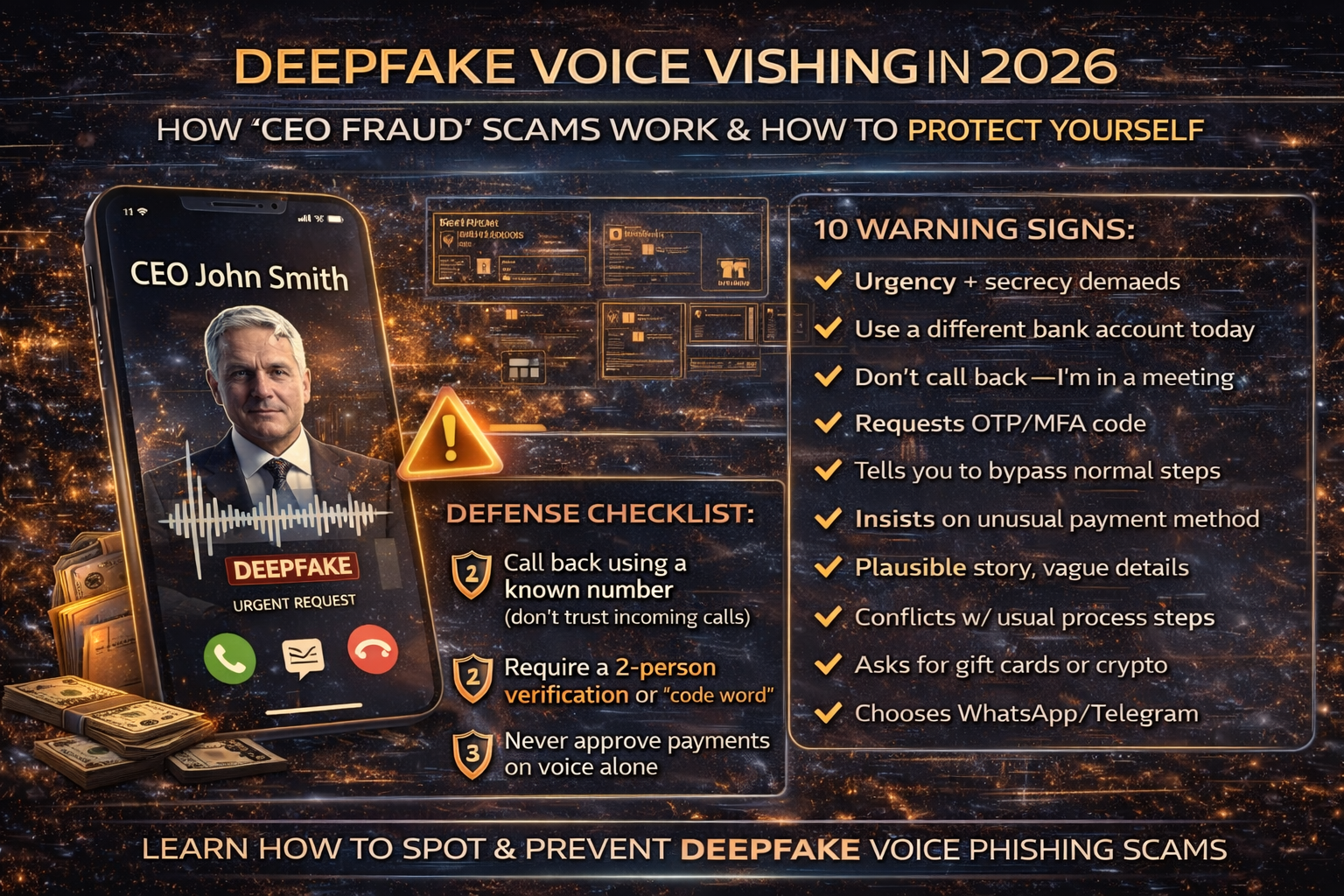
Deepfake Voice Vishing in 2026: How “CEO Fraud” Calls Work, Real Warning Signs, and a Defense Checklist
With AI voice cloning and deepfake audio, attackers can imitate a CEO, finance manager, recruiter, or even a family member convincingly enough to trigger rushed decisions—especially during stressful moments like payroll, vendor payments, or urgent account recovery.
Security reporting and 2026 threat outlooks are increasingly flagging AI-powered impersonation as a fast-growing risk, because it makes social engineering cheaper, more scalable, and more believable.
What Is Deepfake Voice Vishing?
Deepfake voice vishing adds AI to the mix: attackers use voice cloning or synthetic speech to imitate someone you trust and convince you to take an action such as:
- sending money
- changing bank details
- approving a wire transfer
- purchasing gift cards
- sharing OTP/MFA codes
- resetting passwords
- installing “remote support” tools
This is often called CEO fraud when the voice imitates an executive or senior manager.
Why Deepfake Vishing Is Trending in 2026
1) AI makes impersonation fast and scalable
Instead of needing a skilled con artist for every call, attackers can generate believable scripts and voices quickly, then run large campaigns. The World Economic Forum has warned that generative AI will fuel fraud and impersonation attacks in 2026.
2) Real-world cases moved the topic from “theory” to “boardroom risk”
Security analysis pieces have referenced high-impact incidents involving deepfake calls and video-assisted scams that caused massive losses, showing this isn’t a niche threat anymore.
3) It blends perfectly with BEC and phishing
Deepfake voice scams frequently pair with:
- compromised email threads (BEC)
- “document shared” lures
- fake invoices
- fake bank-change requests
So vishing becomes the “push” that forces payment right now, while email compromise provides the “proof.”
How Deepfake Voice Scams Usually Happen
Stage 1: Recon (they learn your org chart and habits)
Attackers gather:
- leadership names and roles (LinkedIn, company website)
- vendors and partners (public invoices, job posts, press releases)
- payment workflows (“who approves what?”)
Stage 2: Pretext (they create a believable story)
Common stories:
- “We’re closing a deal — urgent payment needed”
- “Vendor bank details changed — update now”
- “Payroll issue — fix immediately”
- “IT emergency — verify your account”
- “Legal matter — confidential transfer”
Stage 3: The deepfake call (pressure + authority + secrecy)
The caller:
- uses authority (“I’m the CEO / director”)
- creates urgency (“10 minutes, no delay”)
- requests secrecy (“don’t loop others in”)
Stage 4: The action (money or access)
Most outcomes are:
- payment diversion (wire transfer / bank details)
- credential capture (OTP/MFA, reset links)
- remote access installation
The 10 Biggest Red Flags (Deepfake Voice Edition)
If you hear two or more, treat it as suspicious:
- Urgency + secrecy (classic fraud combo)
- “Use a different bank account today”
- “Don’t call me back — I’m in a meeting”
- “I can’t join video; just do it”
- Request for OTP/MFA codes (legit staff should never ask)
- Weird channel change (“Move to WhatsApp/Telegram”)
- The story is plausible but details are vague
- The caller pushes you to bypass normal approvals
- They insist on gift cards / crypto / unusual payment method
- The request conflicts with normal process (timing, amounts, vendor patterns)
The Best Defense: A “Call-Back + Code Word” Policy
1) Mandatory call-back to a known number
Do not rely on the number that called you.
- Hang up.
- Call back using a phone number from your official directory / CRM / contract.
2) Add a shared verification phrase for high-risk actions
For executive payment requests or bank detail changes, require:
- a verbal code phrase, or
- a two-person verification (“4-eyes rule”)
This beats deepfake voice because the attacker doesn’t know your internal phrase.
3) Never approve payments based on voice alone
Require at least one additional verification:
- written request from known corporate email (but still verify)
- approved ticket in the finance system
- second approver confirmation
- vendor confirmation using the vendor’s known contact method
Business Defense Checklist
Here is the some steps you can follow in order to business defense
A) Finance and vendor payments
- Require two approvals for vendor bank changes and large transfers
- Always verify bank changes using a known vendor phone number
- Lock down who can edit vendor payment details
- Set alerts for changes to vendor bank accounts
B) Identity and account protection
Deepfake vishing is often used to steal:
- MFA/OTP codes
- password reset approvals
- “I’m locked out” helpdesk requests
Protect with:
- “No OTP ever” policy (helpdesk should never ask)
- phishing-resistant authentication where possible
- helpdesk verification steps (employee ID + callback + ticket)
C) Awareness training that matches modern attacks
Train your team on behavior triggers, not “spot the accent”:
- urgency + secrecy is fraud
- any bank change = verify
- any OTP request = block
- any “don’t call back” request = block
D) Email controls (because voice scams often start with email compromise)
A deepfake call often lands better if the attacker already has:
- a real invoice chain
- a real vendor thread
- a compromised mailbox
Microsoft has repeatedly discussed phishing and domain spoofing tactics that enable these kinds of campaigns.
What To Do If You Suspect You Fell for a Deepfake Vishing Scam
- Stop the payment immediately (bank recall / fraud hotline)
- Notify finance leadership and document the timeline
- Verify vendor bank details through trusted contacts
- If credentials/OTP were shared: reset passwords and revoke sessions
- Check email rules/forwarding if BEC is suspected
- Report internally and preserve call recordings/logs if available
About The Author




