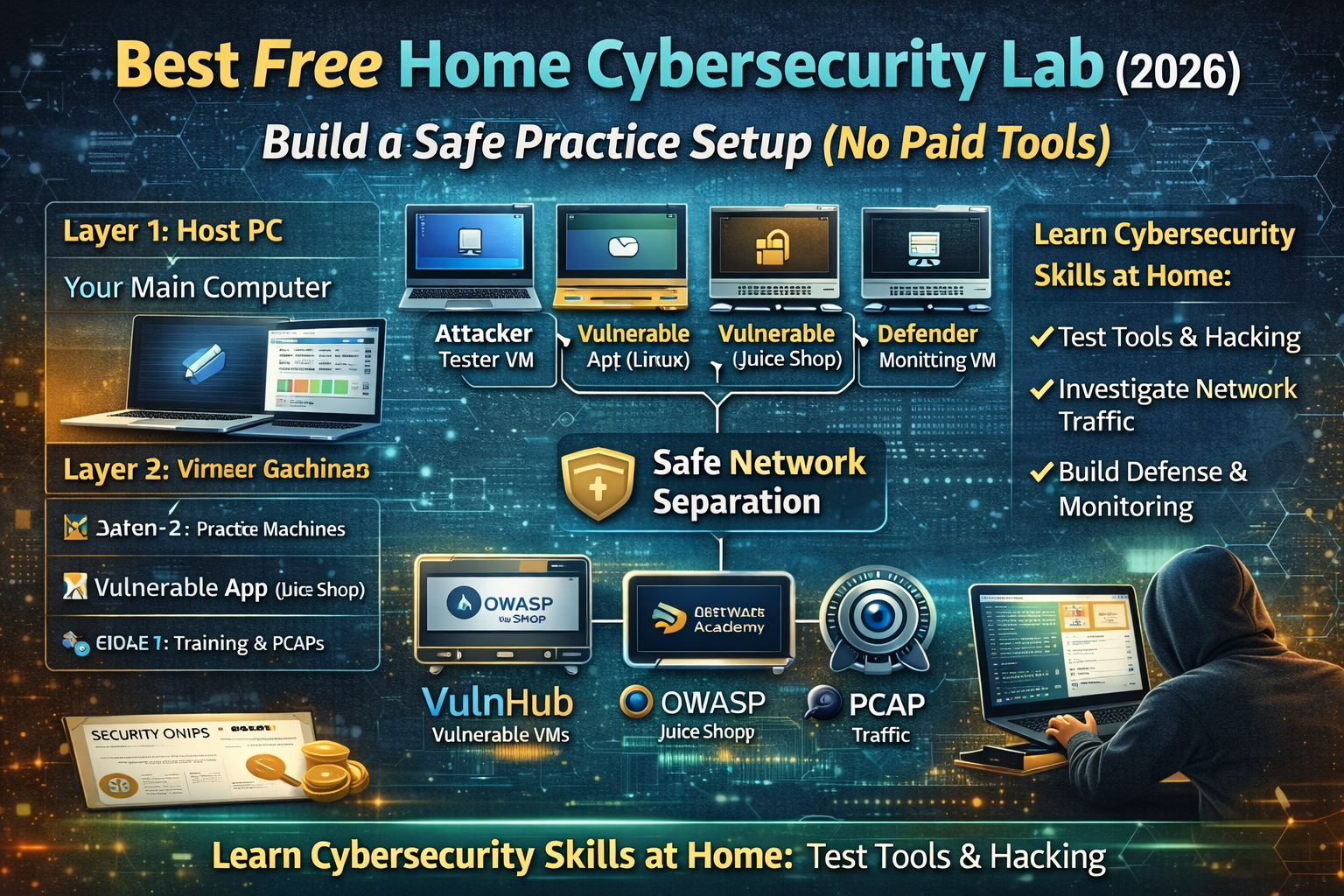
Best Free Home Cybersecurity Lab (2026): Build a Safe Practice Setup (No Paid Tools)
A home cybersecurity lab is the fastest way to turn “I watched a tutorial” into “I can actually do it.” It gives you a place where you can test tools, break things, fix them, and repeat without touching real websites or real people’s devices. The best labs feel simple: one machine you use every day, a few virtual machines that you can reset anytime, and a small set of intentionally vulnerable apps that are meant for training.
This guide builds a complete home lab using only free tools, with a setup that works for common-person readers and stays practical long-term.
The Lab Layout That Works Best at Home
A clean home lab usually has three layers:
Layer 1: Your main computer (Host PC)
This is your normal laptop or desktop. You install virtualization, create virtual machines, and keep your notes and tools here.
Layer 2: Practice machines (Virtual Machines)
These are the systems you attack and defend in a controlled way. You can create both “normal” machines and intentionally vulnerable machines.
Layer 3: Training apps and training traffic (Vulnerable apps + PCAPs)
This is where you practice web security, network analysis, and investigation skills using legal training projects like OWASP Juice Shop and curated PCAP repositories. OWASP Juice Shop is deliberately insecure and designed for training, covering many OWASP Top Ten-style issues.
Hardware That Feels Smooth (Without Buying Anything)
Most people can start with what they already have. The lab becomes more comfortable when you have:
- A machine with enough RAM to run multiple VMs at once.
- Enough storage to keep VM disk files and snapshots.
Even with a modest laptop, a small lab works fine because you can run one vulnerable VM at a time and keep the rest powered off. The key is not “maximum power,” it’s having a setup you can actually use daily.
The Core Tools (All Free)
A full lab does not require expensive software. A basic free stack includes:
- A virtualization platform (to run VMs)
- A couple of OS images (Linux is enough to start)
- A browser and a note system (to document findings)
- Training apps and datasets (vulnerable apps + PCAPs)
Once this foundation is stable, everything else becomes a plug-in: add a new VM, add a new vulnerable app, add a new dataset, practice, then reset and repeat.
Step 1 — Create Two Networks Inside Your Lab (So It Stays Safe)
A lab becomes safer and easier when you separate networking into two modes:
Mode A: Isolated Lab Network
Your vulnerable machines live here. They can talk to each other, but they don’t touch your home network.
Mode B: Internet-Allowed Network
Only the machines that need updates or training downloads use this. Vulnerable machines don’t need internet to be useful, and many people keep them isolated permanently.
This separation helps you practice real scenarios safely: you can build a target environment that behaves like “a small company network” without risking your real devices.
Step 2 — Build the “Three VM” Starter Lab (Simple, Powerful)
A home lab feels complete when you have these three roles:
VM 1: Attacker / Tester Machine (Linux)
This is your practice workstation. You use it to run security tools, test websites, and learn workflows. It doesn’t need to be complicated—just stable, updated, and configured cleanly.
VM 2: Target Machine (Intentionally Vulnerable)
This is where you practice legally. Intentionally vulnerable machines exist for training, and you can reset them after every session. VulnHub is one place that distributes vulnerable VMs designed for hands-on practice.
VM 3: Defender / Monitoring Machine (Optional but powerful)
This machine is used for learning detection, logging, and analysis. This is where you start thinking like a defender: “What evidence exists?” “What logs show this behavior?” “How do we spot it earlier?”
When you add a defender VM, your lab stops being “only hacking” and becomes “real security,” because you can practice both sides.
Step 3 — Add a Deliberately Vulnerable Web App (Best Free Choice)
OWASP Juice Shop (Web Security Practice)
OWASP Juice Shop is a deliberately insecure web application used in trainings and awareness demos, covering vulnerabilities across the OWASP Top Ten and more.
It is one of the best “first vulnerable apps” because it is realistic, widely used, and supports a huge range of learning paths: basic web vulnerabilities, authentication problems, broken access control, insecure design patterns, and more.
In a home lab, Juice Shop gives you a repeatable practice routine:
- You attempt a challenge
- You learn the weakness
- You verify the behavior
- You document the fix mindset
- You reset and try again
That loop is where skills grow fast.
Step 4 — Add a Free Web Lab Platform (No Setup, Instant Practice)
PortSwigger Web Security Academy (Free interactive labs)
PortSwigger’s Web Security Academy provides free online web security training with interactive labs.
This complements your home lab because it removes setup barriers. Even when your computer is slow or you only have limited time, you can still practice real vulnerabilities in a controlled environment.
A strong lab routine is to combine both:
- Use Web Security Academy for quick daily practice
- Use Juice Shop for deeper “project-style” practice inside your own lab
Step 5 — Add Real Traffic for Network Analysis (PCAP Practice)
A home cybersecurity lab becomes more complete when you can practice analysis, not just exploitation. PCAPs help you learn how attacks look on the wire, how malware traffic behaves, and how defenders investigate.
Security Onion documentation even lists multiple public PCAP sources for testing and practice (including Malware Traffic Analysis and NETRESEC).
That’s valuable because it turns network analysis into a repeatable skill:
- Load a PCAP
- Identify infected host behavior
- Extract domains, IPs, and timeline
- Write a clear incident summary
Step 6 — Upgrade Your Lab Into a “Mini SOC” (Still Free)
If your goal is not only learning tools, but learning how real security teams work, you add monitoring. Security Onion is a free platform built for defenders that includes visibility and analysis components.
It also includes workflows around alerts, hunting, and PCAP pivoting, which makes it useful when you want to learn “how investigations are actually done,” not just theory.
A home “mini SOC” lab doesn’t need to be complicated. You can keep it lightweight:
- One VM generates traffic (attacker/tester)
- One VM is the target (vulnerable app/VM)
- One VM monitors (defender)
This becomes a training loop where you can test something and then immediately see the evidence of it.
The Best Free Home Lab Practice Plan (Weekly Cycle)
A home lab works best when it has a rhythm. A simple weekly cycle keeps progress steady:
Day 1–2: Web security practice
Use a vulnerable web app (like Juice Shop) and complete a small set of challenges.
Day 3: Web Security Academy labs
Do a small number of interactive labs and document what happened.
Day 4: Network visibility practice
Open a PCAP and write a one-page case summary (host, domains, timeline). Use public PCAP sources listed in Security Onion docs as your library.
Day 5: One “project day”
Pick one scenario and go deeper. Example: web login security, auth testing, suspicious traffic timeline, or asset exposure mapping.
Day 6–7: Review and reset
Reset VMs, clean snapshots, and update your notes. Your lab stays fast and clean when you maintain it like a system.
FAQs
Can I build a home lab without paying for tools?
Yes. The strongest training projects and lab resources are free: OWASP Juice Shop is deliberately insecure for training and PortSwigger provides free interactive labs.
Where can I get legal practice targets?
Intentionally vulnerable apps and VMs exist specifically for training. VulnHub distributes vulnerable machines for hands-on practice.
How do I practice network analysis at home?
Use legal public PCAP sources and repeat a workflow: identify endpoints, extract DNS, build a timeline, and summarize findings. Security Onion documentation lists several PCAP repositories for testing and practice.
About The Author




